Would you like to know how some websites recovered their rankings after learning how to disavow backlinks in Ahrefs? They removed toxic links, audited their backlink profile, or used Google’s disavow process to improve their SEO?
Understanding how to disavow backlinks in Ahrefs is important for maintaining a healthy backlink profile and protecting website rankings. Harmful or spammy backlinks can affect search engine trust and reduce SEO performance over time.
More so, Ahrefs helps website owners identify suspicious backlinks, analyze referring domains, and prepare data for the Google Disavow Tool. By learning how to disavow bad backlinks correctly, businesses and bloggers can improve link quality and support long-term SEO growth.
Understanding Toxic Backlinks and When to Disavow Them
Moreover, toxic backlink analysis shows links that hurt your search positions over time. You identify bad backlink removal targets through careful review of your profile. Harmful backlinks in SEO come from spammy sites and private blog networks. You must examine every referring domain before you take final action on links. You check traffic patterns and user behavior to confirm real problems.
Types of Harmful Backlinks You Should Watch For_ How to Disavow Backlinks in Ahrefs
- Spam links from automated directories damage your trust signals with search engines every month.
- Paid links violate search engine guidelines and invite penalties on your site quickly.
- Irrelevant directory links add no value to your domain authority score at all.
- Low-quality forum links create negative associations with users and algorithms now.
However, you must act only after you complete a full analysis of every link first.
The Risks and Rewards: Should You Disavow Backlinks?
Therefore, disavowal serves as your last option after other cleanup methods fail. You protect your site from negative SEO attacks and manual penalties effectively.
You regain control over your backlink profile management through smart decisions. You avoid further damage when you remove the worst links in time. You balance your profile so that good links still deliver benefits.

No Tech Jargon. Just More Customers.
We aren’t here to hide behind abstract technical metrics to mask a lack of results. Most agencies use complex algorithmic jargon just to confuse you and justify overcharging. JoseOne enjoys literally 100% client retention because, nothing is expensive when it’s worth what you pay for it.
How Ahrefs Helps You Identify Harmful Backlinks
The next backlink audit in Ahrefs reveals a referring domains analysis with clear metrics. You check domain rating and anchor text patterns for quality signals daily.
So, you spot sudden spikes in new links from unknown sources. You filter results by spam score to find problem areas fast. You export detailed reports to study links away from the tool.
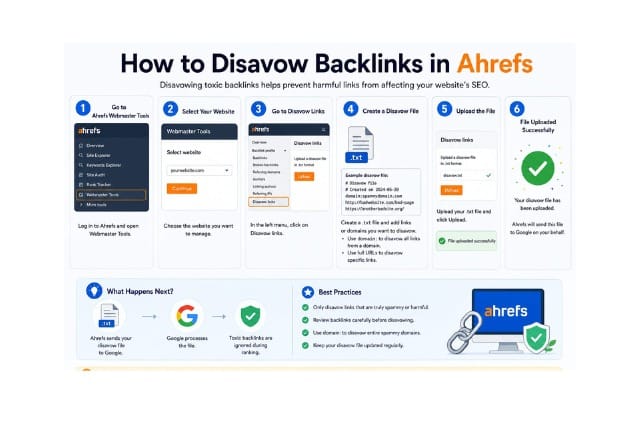
Step-by-Step Guide: How to Disavow Backlinks in Ahrefs
Start your backlink profile management by accessing the site explorer tool now. You review referring domain analysis to spot suspicious patterns quickly. You filter results by spam score and domain rating scores. You export clean lists for further review and action later. You organize data into clear groups based on risk levels.
Creating and Uploading Your Google Disavow File
You prepare the correct format before you submit anything to Google directly. You add domains or specific URLs based on your research findings.
Thus, you double-check every entry to avoid mistakes in your file. You save backup copies of the file on your computer. You follow the exact syntax rules for a successful submission every time.
Best Practices Before You Disavow Any Backlinks
You request link removal and keep records of every contact attempt made. You wait several weeks for responses from site owners before taking the next steps.
In addition, you verify link quality through multiple checks and user behavior data. You document all outreach emails and replies in one central place.
Combining Ahrefs with Google Search Console for Better Results
You compare data from both platforms to make smarter decisions on links. You cross-reference reports to confirm toxic patterns across different sources. You gain complete visibility into links that affect your site performance.
Common Mistakes and How to Avoid Them in Backlink Disavowal
- Disavowing too many links weakens your natural profile strength over months.
- Ignoring high-quality links creates unnecessary problems for rankings later.
- Uploading incorrect file formats leads to submission errors from Google.
- Disavowing without proper analysis risks future SEO issues for years.
Monitoring Results and Measuring Recovery After Disavowal
You track ranking changes and organic traffic after you submit the file. You check Google Search Console reports every week for improvements.
Moreover, you monitor your backlink profile for positive changes over time. You measure keyword positions in target search results regularly. You adjust future strategies based on actual data from your efforts.
Future-Proofing Your Backlinks: Build a Stronger Profile
You create valuable content that attracts good links from real sites. You focus on outreach campaigns that build genuine relationships with authorities.
You participate in industry events to earn mentions from trusted sources. You maintain consistent publishing schedules to support natural link growth.
How to disavow backlinks in Ahrefs gives you complete control over your links. You clean your profile and restore trust with search engines. Backlink profile management creates stronger foundations for long-term success.
In addition, your site gains better visibility while you avoid harmful associations. Businesses recover faster through careful SEO link cleanup practices. Take action today and review your current backlink profile carefully.
Pick suspicious links to address first in your strategy. Watch your results improve month after month with focus. The businesses that master it protect their rankings in 2026 and beyond.
Frequently Asked Questions
What is the Ahrefs disavow process?
You use Ahrefs to find toxic links and then create a file for Google Search Console.
Does Ahrefs have a built-in disavow tool?
Ahrefs helps you analyze links, but Google processes the actual disavow file.
Can disavowing backlinks improve rankings?
Disavowal removes harmful effects and supports recovery from penalties over time.
How long does Google take to process disavow files?
Google usually processes disavow files within a few weeks after submission.
Should beginners disavow backlinks?
Beginners should learn proper analysis first before they disavow any links.
At Final Words
Lastly, how to disavow backlinks in Ahrefs can help website owners maintain a cleaner and safer backlink profile. By identifying harmful links and using the Google Disavow Tool correctly, businesses can reduce SEO risks and improve long-term search visibility.
Regular backlink audits and proper link management also help websites build stronger authority and better organic performance.
Simple Affordable Rates
At JoseOne, we keep it simple. You don’t need a degree in search engine mechanics—you just need more traffic, more phone calls, and more sales. We offer one, fully-loaded package for just $3 per day, to get your business ranking higher on Google, with a 100% Money-Back Guarantee. We handle the technical heavy lifting so you can focus on running your business.