Last night, our marketing team reviewed a Google Ads account with ambitious growth goals. One setting stood out because it could send the campaign toward broader traffic.
More so, unwanted clicks had increased, while useful conversions remained almost unchanged. That review showed why 4 Google Ads settings and recommendations worth a closer look deserve attention before advertisers approve major account changes.
Today, many advertisers rely on Google Ads recommendations to improve campaign performance. Some suggestions can help, but others may not match specific business goals.
A seemingly useful recommendation can also increase spending without improving lead quality. Careful account reviews help advertisers understand each change before applying it.
Thus, strong budget control remains important when every click needs to support business growth. Smart advertisers review default settings before launching or expanding search campaigns. They also test important changes before allowing them to affect the entire account.
Furthermore, a clear review process helps teams manage paid search with greater confidence. Advertisers can protect their budgets while keeping targeting focused on valuable customers. Reviewing account settings also helps prevent small changes from creating unnecessary costs.
What Are Google Ads Recommendations and How Do They Work?
Google Ads recommendations provide automated suggestions for campaign setup and account improvements. Google generates these suggestions by using account activity, campaign settings, and available performance signals. Advertisers can treat these recommendations as useful ideas rather than mandatory instructions.
Google may suggest broader keyword targeting, higher budgets, or changes to campaign settings. Different accounts can receive different suggestions because their goals, data, and structures differ. Accounts with limited activity may also receive fewer recommendations.
However, advertisers should separate useful advice from changes that could affect campaign strategy. Accepting every suggestion can expand targeting or spending without a clear business reason. Reviewing each recommendation against campaign goals creates a safer and more useful process.
The Truth About Optimization Score: Does 100% Equal Higher ROI?
Google displays an optimization score inside the Google Ads account dashboard. The score uses a scale from zero to one hundred percent. Advertisers can use the score as a guide, but it does not measure profit directly.
Many advertisers confuse optimization score with keyword quality score. A quality score relates to factors such as ad relevance, expected click rate, and landing page experience. The optimization score focuses on recommendations and possible account improvements.
More so, chasing a perfect optimization score can lead to unnecessary campaign changes. A higher score does not always mean higher revenue or better lead quality. Profitable campaigns should remain the priority rather than perfect dashboard numbers.
The 4 Google Ads Settings and Recommendations Worth Reviewing
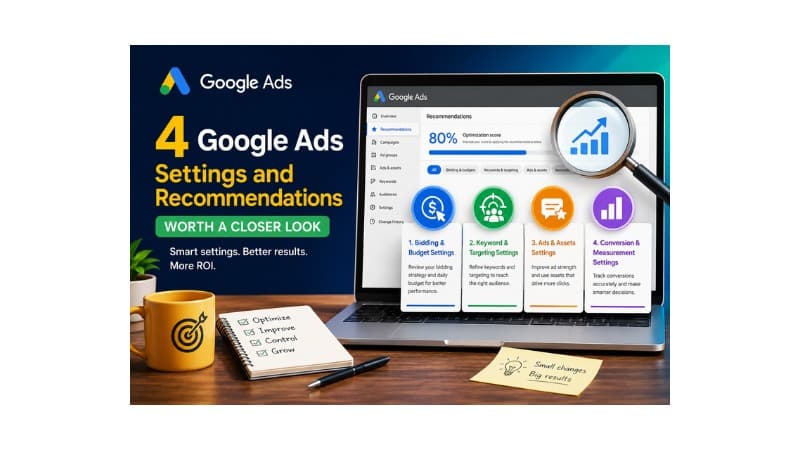
Four areas deserve close attention because they can affect budget and campaign performance. These areas include bidding, keyword and targeting expansion, ads and assets, and conversion tracking. Each area can influence how Google spends money and finds potential customers.
Reviewing these settings helps advertisers keep campaign decisions aligned with their goals. Human judgment remains useful because automated recommendations cannot understand every business objective. A careful review can prevent changes that look beneficial but create weaker results.
Bidding: 4 Google Ads Settings and Recommendations Worth a Closer Look
Google Ads can suggest automated bidding strategies such as Target CPA or Target ROAS. Automated bidding can work well when campaigns have enough reliable conversion data. Advertisers should review available conversion data before changing an established bidding strategy.
Google may also suggest higher daily budgets during periods of increased traffic. More spending does not always produce more profitable conversions. Advertisers should compare budget suggestions with cost per lead, conversion value, and profit margins.
Target ROAS goals also need careful review before campaign changes. A target that sits too high can restrict traffic and reduce conversion volume. A realistic target should reflect actual sales values and business requirements.
Keyword and Targeting Expansion
Google Ads can recommend broad match keywords to increase audience reach. Broad match can also attract searches that do not closely match the business offer. Advertisers who need tighter control may prefer phrase or exact match targeting.
Location settings also require careful attention during campaign setup. Some options can show ads to people interested in a location rather than people within it. The correct setting depends on the campaign’s audience and business goals.
Advertisers can use several safeguards to reduce unwanted traffic:
- Choose location options that match the intended audience.
- Add negative keywords to block irrelevant searches.
- Review Search Partners when outside traffic produces weak results.
Search term reports also reveal queries that waste campaign budget. Adding negative keywords can reduce irrelevant clicks and improve traffic quality. Keyword decisions should remain closely connected to each ad group’s purpose.
Ads and Assets Automation
Google Ads can use automated features to create headlines and other ad assets. Generated content may not always match the brand voice or main offer. Advertisers should review automated assets before allowing them to represent the business.
Google may also recommend Display Network expansion for search campaigns. Advertisers should review that option before adding it to an existing search campaign. Separate campaign structures can make performance easier to measure and compare.
Advertisers can also:
- Disable automated assets that do not match the approved brand message.
- Create separate display campaigns for controlled banner placement tests.
- Test responsive search ads with different messages and offers.
Reviewing asset performance helps advertisers understand which messages attract useful customers. Ad relevance and other campaign signals can also guide future copy decisions.
Conversion Tracking and Measurement Upgrades
Google Ads depends on accurate conversion tracking for reliable campaign decisions. Duplicate conversion actions can count one sale more than once. Such errors can make campaign performance appear stronger than it really is.
Enhanced conversions can improve measurement by using securely hashed customer information. Google Analytics can also provide additional insight into website behavior. Advertisers should review tracking before automated bidding relies heavily on conversion data.
Accurate measurement supports better budget decisions and more reliable performance analysis. Fixing duplicate or incorrect tracking prevents false conversion numbers from guiding campaign changes. Clean measurement gives advertisers greater confidence when evaluating return on ad spend.
Should You Apply Every Recommendation? Evaluating Intent vs. Business Goals
Accepting every recommendation can move an account toward platform suggestions rather than business goals. Each recommendation should support the campaign’s audience, budget, and desired outcome.
Some recommendations can offer clear value when they solve genuine account problems. Removing redundant keywords or fixing broken landing pages can improve campaign structure. Changes with clear benefits are easier to test and measure.
Other recommendations need more careful evaluation before approval. Moving from exact match toward broad match can increase reach while reducing traffic control. Advertisers should reject changes that move targeting beyond the intended customer base.
The key question remains simple: Does this recommendation support the business goal?
Should You Turn On Google Ads Auto-Apply Recommendations?
Google Ads auto-apply recommendations can make selected account changes without manual approval. Depending on the chosen settings, Google may adjust bids, add keywords, or modify ad assets.
Advertisers should keep close control over major bidding, targeting, and budget decisions. A setting that works for one account may create problems for another account.
Some lower-risk tasks may suit auto-apply settings for basic account maintenance. Higher-impact changes deserve manual review before they affect active campaigns.
Account change history can also show which changes Google applied. Regular reviews help advertisers identify changes that no longer fit the campaign strategy.
Beginner vs. Expert Evaluation Frameworks: 4 Google Ads Settings and Recommendations Worth a Closer Look
Beginner advertisers should take a careful approach when managing Google Ads settings. Learning basic metrics such as cost per lead can create a stronger foundation. New advertisers should understand budget, conversions, keywords, and targeting before using advanced automation.
Moreover, expert managers can use controlled tests to compare current settings with proposed changes. Testing one major change at a time makes performance differences easier to identify. Experts should also consider seasonality, competition, and changes in customer demand.
A controlled approach helps separate genuine improvements from temporary performance changes. Strong testing methods can support better decisions across larger and more complex accounts.
How to Review a Recommendation Before Applying or Dismissing It
Start by checking search terms, conversion data, and recent campaign performance. These reports show whether the recommendation fits the account’s current situation.
Next, compare recent results with the campaign’s main goals and budget limits. A suggestion may look useful but still fail to support the desired outcome.
When a recommendation does not fit the strategy, advertisers can dismiss it. Dismissing unsuitable suggestions keeps the Recommendations area more focused.
Advertisers can review dismissed recommendations later when goals or account needs change. Campaign conditions can shift, so a previous decision may become useful later.
Step-by-Step Guide to Auditing Your Account Settings
Begin the audit by reviewing the main campaign settings. Check network options, location targeting, ad features, bidding, and other important defaults.
Next, review search terms to identify irrelevant or low-value traffic. Add negative keywords where needed and confirm that targeting matches the intended audience.
Then, review conversion tracking to confirm that sales and leads receive accurate counts. Incorrect tracking can affect both reporting and automated bidding decisions.
Use the following checklist during each account review:
- Check location settings against the target market.
- Review search terms and add negative keywords.
- Check conversion actions for duplicate or incorrect tracking.
- Review ad assets and automation settings.
- Compare bidding and budget settings with campaign goals.
Regular audits can catch setting changes before they create larger costs. A structured review process also keeps campaign decisions connected to business objectives.
Measuring Results After Applying a Setting Change
After making a setting change, monitor the campaign’s key performance indicators. Review conversion rate, cost per acquisition, return on ad spend, and profit.
Compare new results with previous campaign performance before making another major change. The comparison can show whether the adjustment improved results or created weaker performance.
Seasonal demand and competitor activity can also affect campaign results. These factors may change costs even when advertisers leave account settings unchanged.
Finally, record important account changes in a central change log. Clear records make it easier to connect performance changes with specific account decisions.
Common Google Ads Recommendation Mistakes to Avoid
Chasing a perfect optimization score remains a common Google Ads mistake. Advertisers should focus on profitable conversions and useful traffic instead of dashboard perfection.
Besides, changing many settings at once creates another measurement problem. When bids, budgets, keywords, and targeting change together, identifying the cause becomes difficult.
Changing one major setting at a time creates clearer performance comparisons. Advertisers can then understand which adjustment produced a specific result.
Ignoring account-level settings can also create unnecessary problems. Small changes can affect campaign performance when advertisers fail to monitor them.
Post-change measurement remains essential for every important account adjustment. Without reliable data, advertisers may continue using settings that fail to support business goals.
Frequently Asked Questions
What are Google Ads recommendations?
Google Ads recommendations are automated suggestions for improving campaign settings, targeting, bidding, ads, and account performance.
Should you accept every recommendation from Google Ads?
No, advertisers should compare each recommendation with campaign goals, budgets, audiences, and performance data.
Does applying recommendations improve keyword quality score?
Not directly. Optimization Score and Quality Score measure different aspects of Google Ads performance.
Should you enable Google Ads auto-apply recommendations?
Advertisers should review auto-apply settings carefully before allowing automated changes to affect important campaign decisions.
Why are no recommendations showing in an account?
Limited account activity or data may result in fewer recommendations appearing inside the Google Ads dashboard.
Summing Up
Lastly, paid search success requires careful attention to account settings and automated recommendations. Advertisers should review each suggestion before approving changes that can affect spending or targeting.
Taking time to audit default options can protect campaign budgets and keep targeting focused. Human judgment also remains valuable when automated recommendations cannot understand specific business priorities.