Yesterday, our marketing team spent hours fixing small data errors during audience updates. One wrong ZIP code stopped a full customer file from uploading correctly. Old customer lists also required manual cleanup before new campaigns could launch.
Now, Google expands data manager API with smarter audience management changes that workflow.
In the past, marketers faced major delays while moving customer lists between systems. Small data errors could interrupt daily workflows and leave outdated audiences inside accounts.
The expanded Data Manager API offers better controls for managing customer data across Google platforms. These changes can help advertising teams reduce manual work and maintain cleaner audience lists.
Modern ad teams need faster ways to turn customer data into useful audiences. Clean and updated data can support better targeting and reduce wasted advertising spend. Better audience management also helps teams keep campaigns aligned with current customer behavior.
More so, fresh platform updates bring smoother controls for enterprise customer list management. Marketing teams can connect data sources, manage audience groups, and reduce repetitive tasks. These improvements create a more efficient workflow for teams handling large customer datasets.
Understanding the Google Data Manager API Upgrade
First, brands rely on first-party data to reach customers across digital channels. Customer information can come from stores, websites, mobile apps, and other business systems. Keeping those records updated helps advertising platforms work with more accurate audience information.
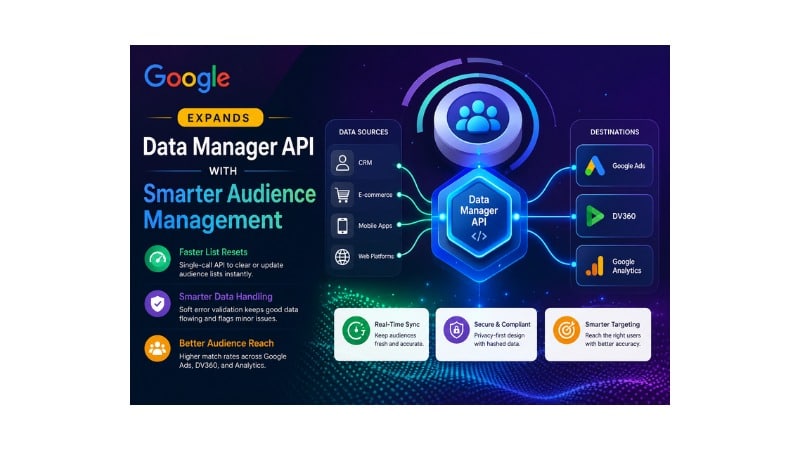
The Data Manager API works as a bridge between customer databases and Google platforms. It helps move customer records into supported advertising and measurement destinations. Direct connections can reduce manual uploads while keeping audience workflows more consistent.
Furthermore, recent updates improve the way teams manage large customer data transfers. Marketers can create connections that update audience records without repeated file uploads. The system also provides tools for handling data errors during ingestion.
The overall workflow connects customer data with supported Google destinations through one management layer. Customer information can move from CRM systems and applications toward advertising destinations. The approach gives teams a more organized way to manage audience data.
Main Capabilities in the Expanded System: Google Expands Data Manager API with Smarter Audience Management
Older workflows could require several requests to remove customer records from an audience. Developers might spend considerable time creating loops that delete records individually. Such processes added unnecessary work to a basic audience management task.
- Single-Call List Resets: Teams can clear audience groups or remove records from a chosen time.
- Soft Error Validation: Field warnings can allow valid records through while identifying incorrect data.
A new list-clearing function can reset audience membership through a single request. Teams can remove full groups or use time-based controls for older entries. The process keeps audience lists cleaner without requiring repeated deletion requests.
Older methods often required several steps before teams could remove audience members. The process could involve fetching records, looping through entries, and deleting them individually. The newer approach reduces those steps by supporting a single list-clearing request.
Smart validation also helps teams handle minor data problems more efficiently. Small errors in certain fields do not necessarily stop valid records from processing. Teams can review warnings and correct problematic records without restarting the entire workflow.
Furthermore, better data quality can improve audience targeting across supported Google advertising channels. Accurate customer information helps systems match users with appropriate audience groups. Stronger audience data can also support more relevant marketing campaigns.

No Tech Jargon. Just More Customers.
We aren’t here to hide behind abstract technical metrics to mask a lack of results. Most agencies use complex algorithmic jargon just to confuse you and justify overcharging. JoseOne enjoys literally 100% client retention because, nothing is expensive when it’s worth what you pay for it.
Data Manager API vs. Google Ads API
Many marketers may wonder how the Data Manager API differs from the Google Ads API. The Google Ads API supports campaign management, bidding, keywords, reporting, and other advertising tasks. The Data Manager API focuses more closely on customer data and audience management.
Google Ads API | Data Manager API |
Campaign management | Multi-destination audience management |
Bid management | Customer Match management |
Keyword operations | Customer data ingestion |
Account reporting | Data validation and audience workflows |
The Data Manager API focuses on customer data management across supported Google destinations. A single integration can support audience workflows across multiple advertising environments. Teams can manage customer groups without building separate processes for every destination.
Using both APIs can give marketing teams broader control over advertising operations. The Google Ads API can handle campaign activity while the Data Manager API manages customer data. Combining their strengths can reduce manual work across complex advertising workflows.
Supported Audience Segments and First-Party Signals
Customer databases contain valuable information about buyers and potential customers. Purchase records, registrations, subscriptions, and other customer actions can reveal useful audience signals. Moving suitable first-party data into advertising systems can create more relevant audience groups.
Customer Match can use customer information to create audience segments across supported Google destinations. Google matches protected customer information against eligible user accounts. Proper data handling helps teams use customer signals while respecting privacy requirements.
In addition, web and mobile app signals can also support broader marketing workflows. Customer actions can reveal interests, purchase patterns, and engagement levels. Connecting useful signals with audience management can help teams create more relevant campaigns.
Top Business Benefits for Modern Brands
Manual file uploads take time and can create opportunities for human error. Repeated uploads can also delay campaign changes when customer lists need frequent updates. Automated audience workflows can keep campaign groups closer to current customer information.
- Faster Audience Exclusions: Teams can remove recent purchasers from campaigns and reduce unnecessary ad exposure.
- Cross-Channel Alignment: Consistent audience groups can support matching campaigns across search, display, and video.
Faster audience updates can help businesses exclude existing customers from acquisition campaigns. Removing recent purchasers can reduce wasted impressions and improve campaign efficiency. Marketing budgets can then focus more closely on new prospects.
Thus, consistent audience management can support a more unified customer experience. Buyers may receive more relevant messages across different Google advertising environments. Consistent targeting can also reduce repeated or unsuitable advertising messages.
Developer Technical Guide for Quick Setup
Successful integration starts with suitable access and authentication settings. Security credentials help ensure authorized systems can send customer data through approved connections. Clear permissions also reduce the risk of unauthorized data access.
The basic workflow connects a CRM or database with the Data Manager API. Customer information follows the required formatting and protection rules before submission. The API then processes the information and returns relevant validation results.
Data mapping requires careful formatting for customer identifiers and related fields. Developers should follow the supported data requirements before sending production records. Clear mapping can prevent field mismatches and reduce avoidable validation problems.
Testing with smaller datasets can reveal integration problems before wider deployment. Diagnostic responses can help developers identify warnings and incorrect fields. Fixing these issues during testing can make larger data transfers easier to manage.
Funnel Strategies for Higher Conversion Rates
Lead generation teams can connect fresh customer information with relevant advertising audiences. New leads from websites and forms can move into appropriate audience groups. Faster audience updates can help campaigns reach prospects during active buying periods.
E-commerce businesses can divide customers according to purchase history and engagement. High-value customers may receive different messages from first-time or inactive buyers. Relevant segmentation can help businesses create campaigns around different customer needs.
Meanwhile, local businesses can connect online marketing data with store activity. Matching customer actions with campaign exposure can provide useful information about advertising performance. Better audience data can help marketers understand which campaigns support store visits and sales.
Simple Affordable Rates
At JoseOne, we keep it simple. You don’t need a degree in search engine mechanics—you just need more traffic, more phone calls, and more sales. We offer one, fully-loaded package for just $3 per day, to get your business ranking higher on Google, with a 100% Money-Back Guarantee. We handle the technical heavy lifting so you can focus on running your business.
Privacy Rules and Data Protection Best Practices
Customer privacy remains important whenever businesses use first-party information for advertising. Marketing teams should collect and use customer data according to applicable privacy requirements. Clear consent practices can help businesses maintain customer trust.
Data protection measures help secure customer information during audience management workflows. Customer identifiers may use hashing or other supported protection methods before transfer. Secure processing reduces unnecessary exposure of sensitive customer information.
Regional privacy requirements can also affect how teams manage audience data. Businesses should honor valid user choices, including applicable opt-out requests. Strong privacy practices support responsible data use and long-term customer trust.
Solving Common Setup Challenges: Google Expands Data Manager API with Smarter Audience Management
Formatting problems can occur when customer files contain missing information or incorrect values. Field-level validation can help separate problematic records from valid customer data. Teams can then correct specific issues without delaying every audience update.
Account permission problems can also interrupt data workflows between connected systems. Checking account access and authorization settings can help identify these issues. Correct permissions allow approved applications to communicate with the required Google services.
Audience size can also affect campaign eligibility and delivery. Combining suitable customer groups may help businesses meet minimum audience requirements. Teams should review available audience information before launching campaigns that depend on customer lists.
Simple Steps to Start Today
Start by reviewing existing customer data workflows and identifying repeated manual tasks. Look for areas where employees still upload, delete, or update files manually. Those tasks can reveal opportunities for API-based automation.
Next, create a small test integration before moving larger datasets into production. Run basic audience updates and review the returned validation messages. Testing smaller datasets makes it easier to identify and fix integration problems.
Finally, train marketing and development teams on the new audience workflow. Campaign managers should understand how audience updates affect active advertising campaigns. Clear processes can help teams use automation without losing control over campaign strategy.
Frequently Asked Questions
What is the Data Manager API?
The Data Manager API connects customer data sources with supported Google destinations. It helps teams manage customer information and audience workflows through programmatic connections.
How do field warnings help data uploads?
Field warnings identify problematic records or fields during data processing. Valid records can continue processing while teams review and correct flagged information.
Can teams clear customer lists with one request?
Yes, the expanded system supports a list-clearing function for removing audience membership. Teams can use the available controls instead of deleting records individually.
Does Data Manager API replace the Google Ads API?
No, the two APIs serve different purposes within Google advertising workflows. Google Ads API handles campaign operations, while Data Manager API focuses on customer data management.
How does the API support customer data protection?
The system supports protected customer information workflows for eligible audience management. Businesses must still follow applicable privacy rules and Google’s data requirements.
Final Takeaway
Lastly, modern marketing teams need efficient tools for managing customer records across advertising systems. Google expands data manager API with smarter audience management, giving teams stronger controls for audience workflows. Faster list management can reduce manual work and improve data quality. Better audience processes can also support more focused advertising strategies.
Marketing teams can start by reviewing manual audience tasks and testing smaller API integrations. Developers can then expand successful workflows while monitoring validation results and privacy requirements. A structured approach can help businesses gain more value from first-party customer data.