Why is Google Tests Blue Send Button Replacing AI Mode in Search Box, and how could this small UI change affect the way people search every day?
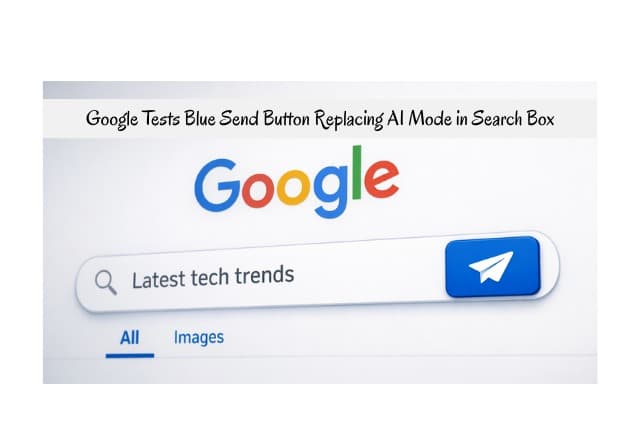
Google tests blue send button replacing AI mode in search box as part of ongoing efforts to refine user interactions. So, this test alters visuals when users type queries.
More so, Google shows a blue Send button instead of AI Mode. Google aims to guide direct search actions. It update seems minor yet influences behavior and flow.
People discover AI results differently now. Regular users and SEO pros prepare for changes. Google search box update sparks talks online.
Introduction to Google’s Blue Send Button Test: What Is the Blue Send Button Google Is Testing?
Moreover, people spot Google changes fast. Google tests blue send button replacing AI mode in search box right now. Experts notice this shift in early January 2026. Users type words and see the button appear. The blue button replaces the AI one. Online discussions grow quick. Google seeks simpler searches.
Users spot a blue button with “Send”. People click it for fast results. It trends in headlines. Beginners grasp it easily. Experts spot larger plans. Reports flow from Search Engine Land.
First, grasp the basics. Google runs tests to boost tools. So, this blue send button test targets smooth flow. Users type and watch changes happen. AI mode steps back.
The send button directs to the results. Folks share screenshots on X. Shameem Adhikarath uploads a video. He demonstrates the switch clearly. Khushal Bherwani backs it up. Full rollout waits still. Google keeps silent.
How the Blue Send Button Works — A User’s Perspective
Next, users land on the Google homepage. They view an empty search box. The AI mode button rests on the right. Plus sign stays for uploads. Lens and mic icons appear too.
Then, users begin typing text. One letter triggers the shift. The AI button vanishes quickly. Blue send button takes place. The button looks round and blue. White text reads “Send” clearly.
Moreover, users continue to query input. Button remains in view. People press Enter or click send. Standard results load up. AI mode skips start.
Besides, users erase the box. They backspace every letter. Original buttons come back. AI mode returns fast.
Also, users still upload files. Plus sign functions fine. It launches AI mode.
In addition, voice search hides the mic. Icon disappears during type. Users adjust in seconds.
Finally, beginners enjoy the feel. It mimics chat apps. Experts praise seamless use. Google search UI experiment stands out.
- Open the Google homepage and see an empty box.
- Type one character to trigger blue Send.
- Click Send or hit enter for classic results.
- Clear the box to restore AI Mode access.
What Is AI Mode in Google Search?
Google launched AI Mode in 2025 as a powerful conversational search feature within Google Search. Users experience it like a chatbot, where they ask complex questions and receive detailed, AI-generated responses.
AI Mode runs on advanced Gemini models, often Gemini 3, which provide deep reasoning, multimodal understanding for text, images, voice, and even file uploads. People type queries, speak them, snap photos, or upload images and files for analysis. The system delivers comprehensive answers with summaries, step-by-step guidance, and dynamic visuals.
In addition, users follow up easily in a chat-style interface to dive deeper into topics. AI Mode stands apart from AI Overviews, which offer quick summaries at the top of standard results. AI Mode creates a full conversational session for tougher, multistep queries.
Google promotes it as the most intelligent search option to rival standalone tools like ChatGPT. Beginners use it for straightforward yet in-depth help on hard topics.
Moreover, experts leverage its advanced capabilities for research and planning. The current test with the blue Send button temporarily hides direct access during typing to prioritize classic search.

No Tech Jargon. Just More Customers.
We aren’t here to hide behind abstract technical metrics to mask a lack of results. Most agencies use complex algorithmic jargon just to confuse you and justify overcharging. JoseOne enjoys literally 100% client retention because, nothing is expensive when it’s worth what you pay for it.
Why Google Might Be Testing This UI Change
Google reviews vast user data and notices many people bypass AI Mode for faster, traditional results. Some users feel confused by multiple buttons in the search box. The blue Send button removes distractions and creates a clearer path to submit queries.
Therefore, engagement metrics show lower usage in AI Mode compared to classic search, which supports ads and revenue. Google hides AI options as users type to encourage quick submissions. User feedback highlights that too many choices cause overload. Google balances heavy AI promotion with keeping core link-based search strong and familiar.
So, this AI Mode replacement during typing aligns with a strategy to reinforce classic habits while preserving AI access via uploads or voice. Experts point to data-driven decisions behind these interface tweaks.
Technical Behavior: When Does the Blue Send Button Appear?
The search box starts empty, with the AI Mode button and icons visible on the right. Users type a single character, and the switch happens instantly. JavaScript code executes on the client side to hide the AI Mode, Lens, and microphone icons.
Thus, the blue Send button loads in its place at the right end with a rounded design and white text. The plus sign for uploads remains available as an AI entry point.
Users backspace to clear the box, and the original icons restore immediately. The test appears in select browsers and regions as part of a limited rollout. No noticeable lag occurs during the transition. Users enjoy smooth, intuitive shifts in this Google search interface update.
Differences Between Classic Search, AI Mode, and Blue Send Button
Classic search accepts a typed query when users hit enter or click the magnifying glass. Results display links, ads, images, and snippets in the familiar format. AI Mode launches a dedicated chat session that offers AI-generated summaries first and supports ongoing follow-up questions.
Whether the blue Send button directs submissions straight to classic results and limits easy AI access during typing. Classic search fits best for simple facts, navigation, or quick checks. AI Mode excels at complex, multi-faceted needs requiring reasoning or planning.
The button appears automatically on typing to guide toward standard links. AI Mode now requires an empty box, a plus sign click, or an alternative entry like voice.
Users select based on goals for either quick wins or deep dives. Google tests blue send button replacing AI mode in search box, changing these daily choices.
- Classic search: Type query, hit enter, view links.
- AI Mode: Click the empty button, chat for summaries.
- Blue Send: Type text, click Send, get standard results.
Impact on Search Behavior for Users: Beginners’ and Experts’ Perspectives
Beginners manage basic queries every day and find that the button speeds up the entire process. They avoid AI complexity and stick to familiar, reliable paths. Experts observe broader trends and predict gradual declines in AI Mode usage.
Further, habits shift toward more precise query terms to optimize classic links. Confusion drops across all users as clear routes help everyone submit faster. Beginners adjust in moments, since the design feels natural and chat-like.
Experts monitor key metrics closely as overall behavior changes take hold. Users increasingly favor classic search more for routine tasks in this evolving Google search behavior change.
Implications for SEO and Search Marketers
Marketers focus on link rankings and see rises in classic search boost organic clicks to websites. AI summaries often reduce direct traffic from overviews. The button helps publishers by routing more queries to traditional results.
Teams track emerging test data and tweak content strategies accordingly. Snippets and featured positions gain extra value in visible spots. Ads attract more views and interactions as classic pages load. Next, professionals use Search Console tools to spot traffic shifts early. AI-powered search features continue to challenge visibility. Balance becomes crucial for long-term success. Effects could expand significantly if the change becomes permanent.
Is This Change Live for Everyone? What’s A/B Testing? And How Was It Spotted?
Few users encounter the feature since tests target small, selected groups only. A/B testing splits audiences into variants, where one group views the new design. Google measures clicks, submission times, mode selections, and satisfaction. Winners advance based on positive performance data.
Spotters discovered it on January 2, 2026, when Shameem Adhikarath posted video evidence on X. Confirmations arrived quickly from others like Khushal Bherwani. News sites covered details fast, with SE Roundtable and Search Engine Land leading reports. The style mirrors previous quiet Google Labs search tests. Broad rollout awaits full results and decisions.
History: How Google Has Integrated AI Into Search Over Time and Similar Tests
Google began major AI integration in Search with AI Overviews, launching widely in 2024. Lab experiments allowed early users to test generative features. AI Mode arrived fully in 2025 with a dedicated button for conversational access. Voice search added deeper AI paths, and multimodal options grew fast.
Prior tests often concealed or swapped icons to measure real usage patterns. Button priorities shifted in experiments, like emphasizing the microphone sometimes.
Trends pushed aggressive AI growth across interfaces. Balance adjustments return now amid user preferences. History shows Google makes constant tweaks and adapts features directly to real-world feedback from billions of searches.
Simple Affordable Rates
At JoseOne, we keep it simple. You don’t need a degree in search engine mechanics—you just need more traffic, more phone calls, and more sales. We offer one, fully-loaded package for just $3 per day, to get your business ranking higher on Google, with a 100% Money-Back Guarantee. We handle the technical heavy lifting so you can focus on running your business.
User Feedback and Early Reactions to the Change_ Google Tests Blue Send Button Replacing AI Mode in Search Box
Users share reactions on X with views that mix positive and negative. A good deal of praise for the cleaner design, since visual clutter drops noticeably. Some miss simple AI access and find entry points harder now.
Posts highlight faster submission speeds as queries are processed quickly. Forums debate potential effects as SEO communities join actively. Complaints remain minor overall in these early stages. Feedback combines with data to shape Google’s next path. More reactions continue to build daily.
Will This Replace AI Mode Permanently? Expert Opinions, Comparisons with Competitors, and Future of Search
Experts predict the change could stay if metrics prove strong performance. Data ultimately decides the final fate. Bing integrates Copilot prominently on the side with constant access available. Google chooses concealment during typing for a sharper focus on classic flow.
More so, paths differ clearly between competitors. Users still pick AI through file uploads or voice commands easily. Tips help match daily use to specific needs, like quick facts versus deep reasoning. Future interfaces mix features more seamlessly with rising personalization. The impact of AI on Google Search keeps expanding as tests mold the overall direction.
Google tests blue send button replacing AI mode in the search box could endure long-term. Users evolve new habits gradually. Search transforms ahead in meaningful ways. People watch updates closely. It marks a key shift. Changes often arrive in this space. Everyone always stays ready. It defines the emerging era.
Frequently Asked Questions
What does the blue Send button do in Google Search?
Blue Send button submits queries directly. It shows on typing starts. Action speeds classic search.
When does Google replace AI Mode with the blue Send button?
Replacement triggers on typing. Text entry hides AI Mode. Blue Send takes the spot.
Is this search box change available to all users?
Test limits to select users. Google expands after review.
How is this different from Google’s AI Mode?
AI Mode offers chat answers. Blue: Send leads to links.
Why does this update matter for SEO and publishers?
Behavior shifts boost organic clicks. Sites regain visibility.
Conclusion
Lastly, Google tests Blue Send Button Replacing AI Mode in Search Box to experiment with how people start searches. So, this test highlights Google’s focus on simplicity and user intent.
While AI remains important, Google continues to balance traditional search actions with new AI features. Watching these tests closely helps users, marketers, and website owners understand where search is heading next.